
Appearance
Markers
Reference points you drag. Not data — a marker draws nothing from the query — but a handle: the origin and destination of an isochrone, the centre of a radius, the two ends of a profile. Each one is bound to a pair of dashboard variables, so dragging it re-runs whatever those variables feed.
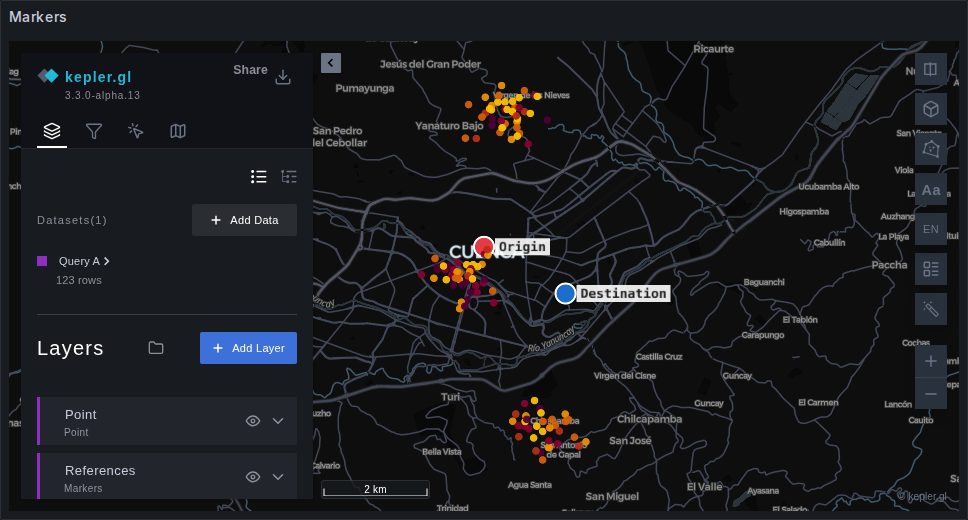
Adding the layer
Markers ignore their dataset, so it does not matter which one they are attached to. In kepler's layer panel: Add Layer, pick Markers — it carries the amber icon the panel's own layer types use — and choose any dataset on the map.
Then + Add marker, as many times as you need. Each new marker gets the next letter as its label and a colour of its own, and lands in the middle of what the map is showing.
Binding it to variables
Every marker row has two fields, Latitude variable and Longitude variable. Type the names of two dashboard variables — without the $ — and the marker publishes to them.
sql
-- A query that follows marker A
SELECT *
FROM isochrone(ST_Point($origin_lng, $origin_lat), 900);
A marker with no variable names still drags; it just tells nobody. That is occasionally what you want — a visual mark on a shared dashboard.
The rules worth knowing
One write per gesture. The pair is written when you release the marker, not while you drag it. A query hanging off those variables — a routing service, an isochrone, a spatial join — runs once per drag rather than once per pointer move, which is the difference between a usable map and a melted one.
The variables are the source of truth. A marker also moves when its pair changes from somewhere else: a text box, another panel's data link, a link someone shared with you. The position stored in the layer is only the last one seen, and it is what a marker falls back to when its variables hold nothing.
A marker dropped where it was picked up writes nothing. The comparison is numeric, so no query re-runs because a value came back as -79.0 instead of -79.
Order of precedence for where a marker sits, on load:
- what its variables hold;
- the position saved in the map configuration;
- the centre of the current view.
That order is why a dashboard opened from a shared link shows the sender's markers rather than the saved ones — the link carries the variables.
Styling
| Setting | What it does |
|---|---|
| colour swatch | per marker; five distinct defaults are handed out in turn |
| Label | the caption drawn beside it, A, B, … by default |
| Symbol | any shape from the symbol catalogue |
| Rotation (°) | turns the symbol; a circle has nothing to turn |
| Marker size (px) | how big they are drawn |
The default circle is drawn as a filled dot with a white ring rather than from the symbol atlas: it reads on any base map and it is the easiest target to grab.
Saved with the map
Markers live in the layer's configuration, so Save current map stores them — their labels, colours, variable bindings and last positions — with the dashboard. A dashboard that ships with two markers already bound is a dashboard whose reader has nothing to set up.
When it is not markers you want
- You want a mark per row of the query → Symbols
- You want the clicked place published, not a dragged one → Cross-filtering, the coordinate channel
- You want a region rather than a point → Publishing viewport and areas