
Appearance
Network links
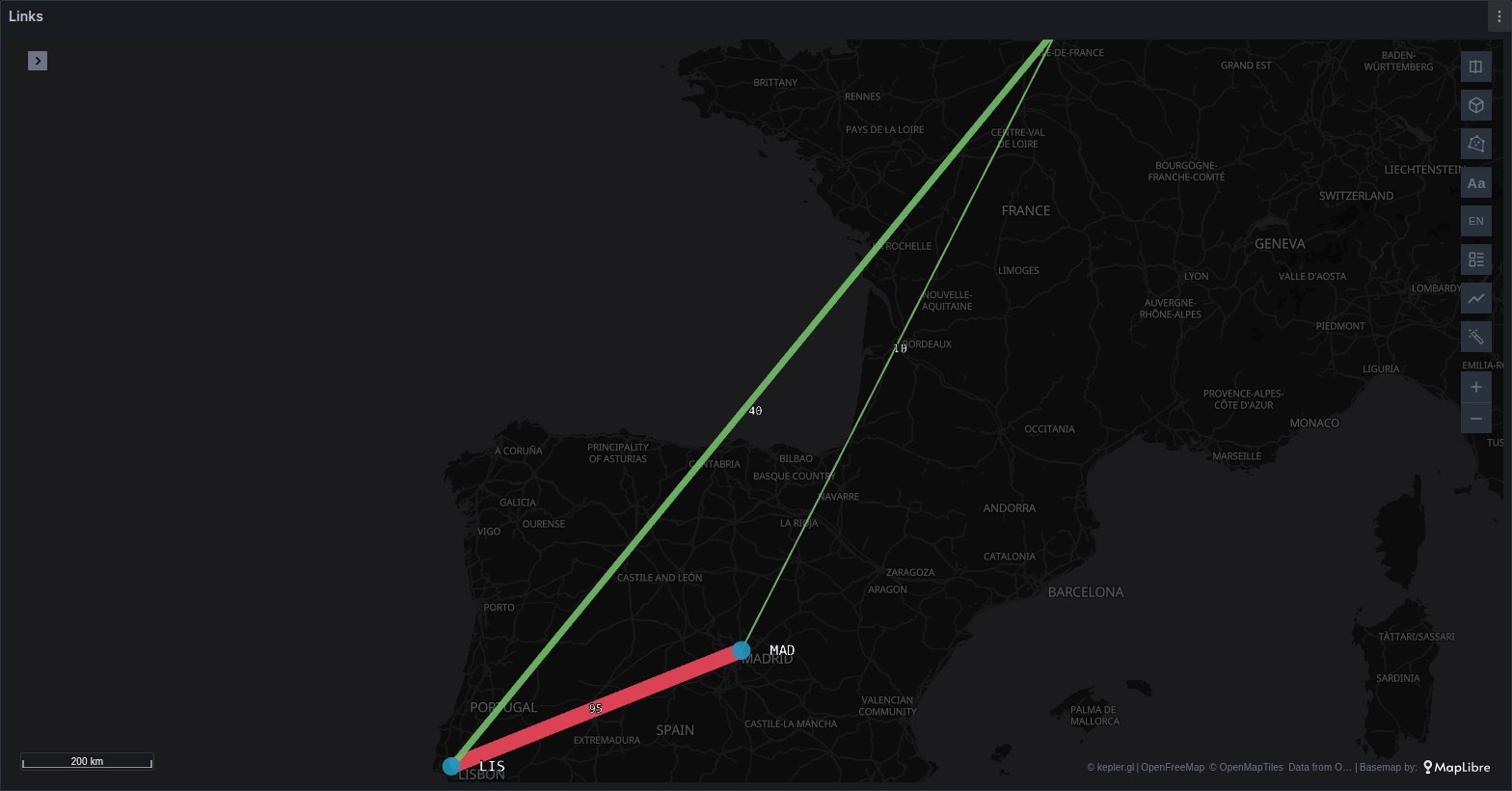
A link query names the two sites each row connects, such as two data centres, two cloud regions or two points of presence, and carries a metric for the link between them. The Plus panel places both ends by name and draws one line per row, coloured by the panel's thresholds, with each end a named dot and the metric written at the middle of the line: a weathermap, with no coordinates in the query and no styling of your own.
Two shapes of query
One frame with source and target columns
The simplest shape is one table with a text column for each end and a number for the link:
| source | target | Value |
|---|---|---|
us-east-1 | eu-west-1 | 420 |
us-east-1 | ap-south-1 | 95 |
eu-west-1 | eu-central-1 | 610 |
A Prometheus query such as sum by (source, target) (link_mbps), with Format: Table, returns exactly this.
The two columns are found by name, matched exactly, ignoring case and reading a dot as an underscore:
| End | Column names, tried in this order |
|---|---|
| Source | source, src, from, origin |
| Target | target, dst, dest, to, destination |
Both must be text columns. Columns with a stem, such as src_region and dst_region, are not links: they are flows, drawn by the free panel's Flow layer; see Flows between two places.
A node graph: nodes and edges
The second shape is the one Grafana's Node graph panel reads: an edges frame with source and target columns that hold node ids, and a nodes frame that says where each id is.
Nodes:
| id | title | region |
|---|---|---|
n1 | Virginia | us-east-1 |
n2 | Ireland | eu-west-1 |
n3 | Frankfurt | eu-central-1 |
Edges:
| id | source | target | mainstat |
|---|---|---|---|
e1 | n1 | n2 | 420 |
e2 | n2 | n3 | 610 |
A frame is taken for the edges when its name or its query's refId is edges, or when the data source marks it for the Node graph and it has source and target text columns. A frame is taken for the nodes when its name or refId is nodes, or when the data source marks it for the Node graph and it has an id column but no source or target.
The nodes frame places each id in one of two ways:
- by coordinates: latitude and longitude columns, detected as the free panel detects them;
- by a place column that Places recognises: a cloud region, an airport or point of presence, a country, an IP address or a geohash. States and districts cannot place nodes.
Without a nodes frame, the edges' own source and target values are read as place names, as in the first shape. Only the first edges frame and the first nodes frame of a panel are read.
The nodes frame is drawn as its own dataset, as any query would be. A node graph therefore gets no named dots from Plus: style the nodes frame's layer instead.
How the ends are placed
The ends of a link are looked up as Places looks up a value, with three differences:
- Only four kinds are tried, in this order: cloud region or zone, IP address, airport or point of presence, geohash. Both columns must fit the same kind for at least 80 % of their first 50 values. Countries and states are never tried, so a site called
INorDEis not taken for India or Germany. (A node graph's nodes frame can still place its nodes by country.) - An airport must look like one: an upper-case IATA code such as
MIA, or three letters followed by one or two digits, such asams1orFRA56. A three-letter name in lower case, such asprdorstg, is not taken for an airport, although many of them are real airport codes. - A query that the free panel already draws is left to it. When the frame has coordinates, a geometry, H3 or a Field mapping, it is not read as links.
A row is drawn only when both of its ends are placed. The others are counted in a note in the map's corner, with up to three of the names that were not found:
Links: 2 not placed (lab-west, lab-east)
What is drawn
A placed link query adds three layers to kepler, stacked so that a line never covers its labels:
| Layer | What it shows |
|---|---|
| Links, a Line layer | one line per row, coloured by the metric's thresholds, its width following the metric |
| named dots | each end once, as a dot labelled with its source or target value (not for a node graph with a nodes frame) |
| midpoint labels | the metric at the middle of each line, formatted with its unit |
The layers are added the first time the panel sees the query. After that they are part of the saved map, and you can restyle them, hide them, or switch the line layer to Traffic like any other layer.
The metric
The link's metric is the edges frame's mainstat column when it is numeric, and otherwise its first numeric column, other than thickness and id. Without a numeric column the lines are drawn in one colour and the midpoints carry no text.
Colours from the thresholds
The lines take the colours of the metric's Thresholds, set in the panel's field options (Edit panel → Thresholds), so the map agrees with every other panel that reads the same thresholds. Each colour starts at its step's value, as in Grafana: with green as the base, orange at 50 and red at 80, a link at 65 is orange.
Only Absolute thresholds are used. Percentage thresholds depend on a minimum and a maximum the map does not have, so the lines fall back to Grafana's default, green below 80 and red from 80, and the map's corner says:
Links: percentage thresholds are not supported; default colours used
Width
The line's width follows the metric, from 1 to 8 pixels. When the edges frame has a numeric thickness column, as node graph data sources often provide, the width follows that column instead, and the colour still follows the metric.
Labels and units
Each midpoint label is the metric formatted with the field's Unit and Decimals from Standard options: with the unit set to megabits per second, a value of 420 reads 420 Mb/s. A row with no value draws no label.
The tooltip of a line shows source, target and the metric first, then every other column of the query. Those columns stay in the links dataset, so they can also colour, filter or label the layer in kepler.
Over time
When the query has a time column, each row is the link at that instant, and kepler's time filter replays the links: lines and labels show only at their own step. See Time playback. Two-way traffic, as A→B and B→A rows or as in and out columns on one row, is covered under Traffic.
A query is drawn up to its first 5,000 links. Beyond that, the map's corner says Links: showing the first 5000 of 12000 rows, and the rows past the limit, a timeline's last steps for instance, are not drawn.
See it in the layer tour
The Power grid map of the layer tour, installed with the app, draws a link query as a Traffic layer: the interconnectors between sixteen European countries, from a frame of source and target rows with a time, beside a nodes frame that gives each country its coordinates.
From Prometheus, a query such as sum by (source, target) (link_mbps) gives the one-frame shape: no metric name is common to every vendor and SNMP exporter, so use your own link metric. Keep the source and target labels, or rename yours to them with label_replace.
When links do not draw
- No lines at all. Check the column names against the tables above, and that both ends hold values of one kind: two columns of cloud regions, or two of airport codes, not one of each. A query with latitude and longitude columns is drawn by the free panel, not as links.
Links: n not placed (…). The names in the note are not cloud regions, IPs, airports or geohashes Plus knows. Map your own site names to one of them in the query, or give a node graph a nodes frame with coordinates.- The lines are one colour. The metric has no thresholds, or they are in percentage mode, or the query has no numeric column.
- No line layer after adding a link query to a saved map. The layers are added only while the saved map does not already decide what is drawn. Add a Line layer in kepler on the links dataset, with
srclat,srclng,dstlatanddstlngas its columns.
Related pages
- Traffic: the same links, with comets running from source to target.
- Pipeline: the same animation along a real route instead of a straight line.
- Origin–destination flows: flows between coordinates in the free panel.