
Appearance
Pipeline
The Traffic animation along a real route instead of a straight line. Each row's line from the query carries comets, dashes, dots or a pulse from its first point to its last, with the speed, colour and width from its metric and an optional height above the ground.
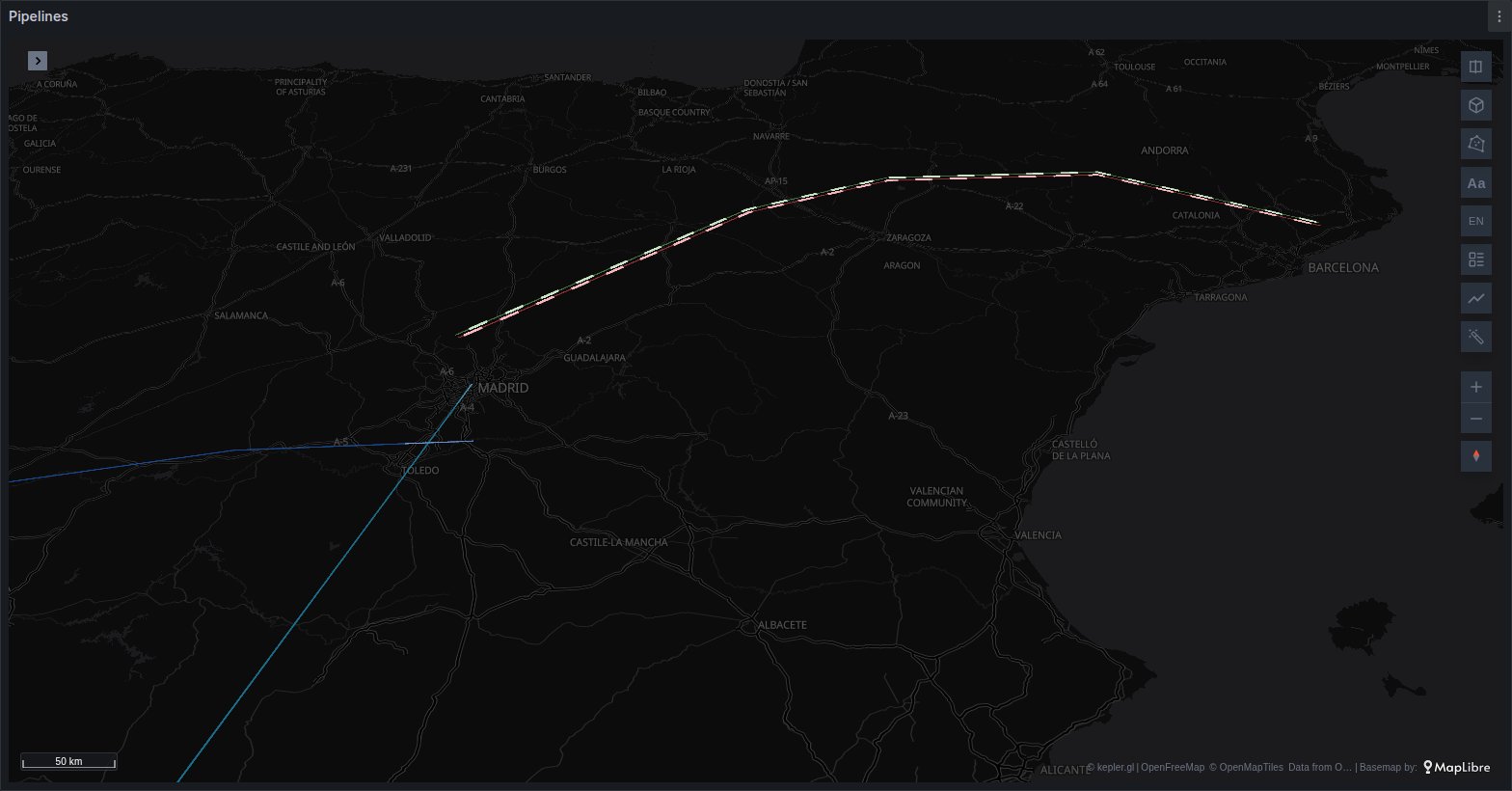
What the query needs
One row per line, with a geometry column. The column can hold GeoJSON, WKT or WKB hex, as any geometry column in the panel can; see Geometry.
sql
SELECT name, geom, flow_m3h
FROM pipelines;
What Pipeline draws from each row:
- a LineString;
- a MultiLineString, each part drawn and animated in turn, in the order the geometry lists them;
- a GeometryCollection, for the lines inside it.
Points and polygons are skipped, and so is a line with fewer than two usable vertices or no length. A third coordinate on a vertex is read as its height in metres.
Pipeline reads the geometry column only. A table with one row per point is not joined into a line; build the line in the query instead, for example with PostGIS ST_MakeLine.
kepler builds a GeoJSON layer for a geometry column. Change its type to Pipeline in kepler's layer panel, or add a Pipeline layer on the same dataset: it takes the dataset's geometry column. A Pipeline layer is never created by itself.
Options
Pipeline shows kepler's Stroke Color, Stroke Width and Elevation Scale settings, a Pipeline group, the same Reverse direction group as Traffic, kepler's Label panel and an Interaction group.
| Option | What it does | Default |
|---|---|---|
| Stroke Color | a single colour, or a field with its colour range | one colour |
| Stroke Width | line width, or a width field | 2 |
| Elevation Scale | multiplies every height the layer draws | 1 |
| Speed | the field that paces the flow, as in Traffic | none |
| Altitude | a numeric field of metres added to every vertex of the row | see below |
| Base altitude (m) | metres added to every row, 0 to 5,000 | 0 |
| Two-way links | Straight or Lanes | Straight |
| Lane gap | how far apart the two lanes draw, 0.5 to 3 line widths (Lanes only) | 1 |
| Reverse | runs every row from its last point to its first | off |
| Signed speed reverses direction | a negative speed runs its row backwards, at the pace of its absolute value | off |
Style, Laps per cycle, Cycle (s), Comet length, Spacing (px), Dash length, Animate and Glow follow, and work as in Traffic. So do labels, Allow hover and History. Pipeline has no Split and no Arc.
Direction
The flow runs the way the geometry is drawn: from the first vertex to the last, and through a MultiLineString's parts in order. If your lines are stored the other way round, turn on Reverse.
When the sign of the metric is the direction, as with a flow that can run either way, turn on Signed speed reverses direction. A row with a negative speed then runs backwards, and −10 runs as fast as 10.
Lanes works as in Traffic. Two rows whose lines run end to end in opposite directions, the first point of one being the last of the other, pair by themselves (at the same time value when the data has a time column), and each draws to the right of its own travel, Lane gap apart. For one row with in and out columns, set the reverse fields; a row without a Reverse speed field runs its reverse lane at its forward pace. See Two-way links.
Height above the ground
A line's height in metres is its vertices' own third coordinate, plus the Altitude field, plus Base altitude (m), all multiplied by Elevation Scale. Use it to lift a power line onto its pylons, or to separate lines that share a corridor.
A new layer takes Altitude from the first numeric column named altitude, elevation, alt or height. Heights are measured from the ground, not from sea level: a column of elevations above sea level lifts the line hundreds of metres up, and it disappears when you zoom in below it. Clear the field when that is what the column holds.
Long lines
The line you see keeps every vertex. Comets follow a lighter copy, simplified to within 10 m of the line, so long, detailed routes stay smooth. Dashes, dots and a pulse ride the full line and are never simplified.
When a large set of lines would still need too many comets, the top of Laps per cycle is lowered and the Pipeline group says Comets thinned to stay smooth. Fewer laps, simpler geometry or the Dashes style lift it.
When it does not draw
- Nothing at all. The layer is not reading a GeoJSON geometry column: kepler's table and GeoArrow column modes draw nothing in Pipeline.
- Some rows are missing. Their geometry is a point or a polygon, or a line with fewer than two usable vertices.
- The line vanishes as you zoom in. It is drawn above the camera; check Altitude, Base altitude (m) and Elevation Scale.
- Lanes looks like Straight. On the globe, Pipeline draws Straight. Elsewhere, a row draws on its axis when nothing pairs it and no reverse field is set.
- A grey line with no comets. The row's colour field has no value.
Use it for
Gas and oil pipelines, power lines, water mains and sewers, rivers and canals, fibre routes, conveyor or rail lines. For links between two sites with no route of their own, use Traffic.