
Appearance
Places without coordinates
Observability data rarely carries latitude and longitude. It names places instead: a cloud region, an availability zone, a k6 load zone, a CDN point of presence, a country, a client IP. The Plus panel looks those names up and puts the rows on the map, with no change to your query.
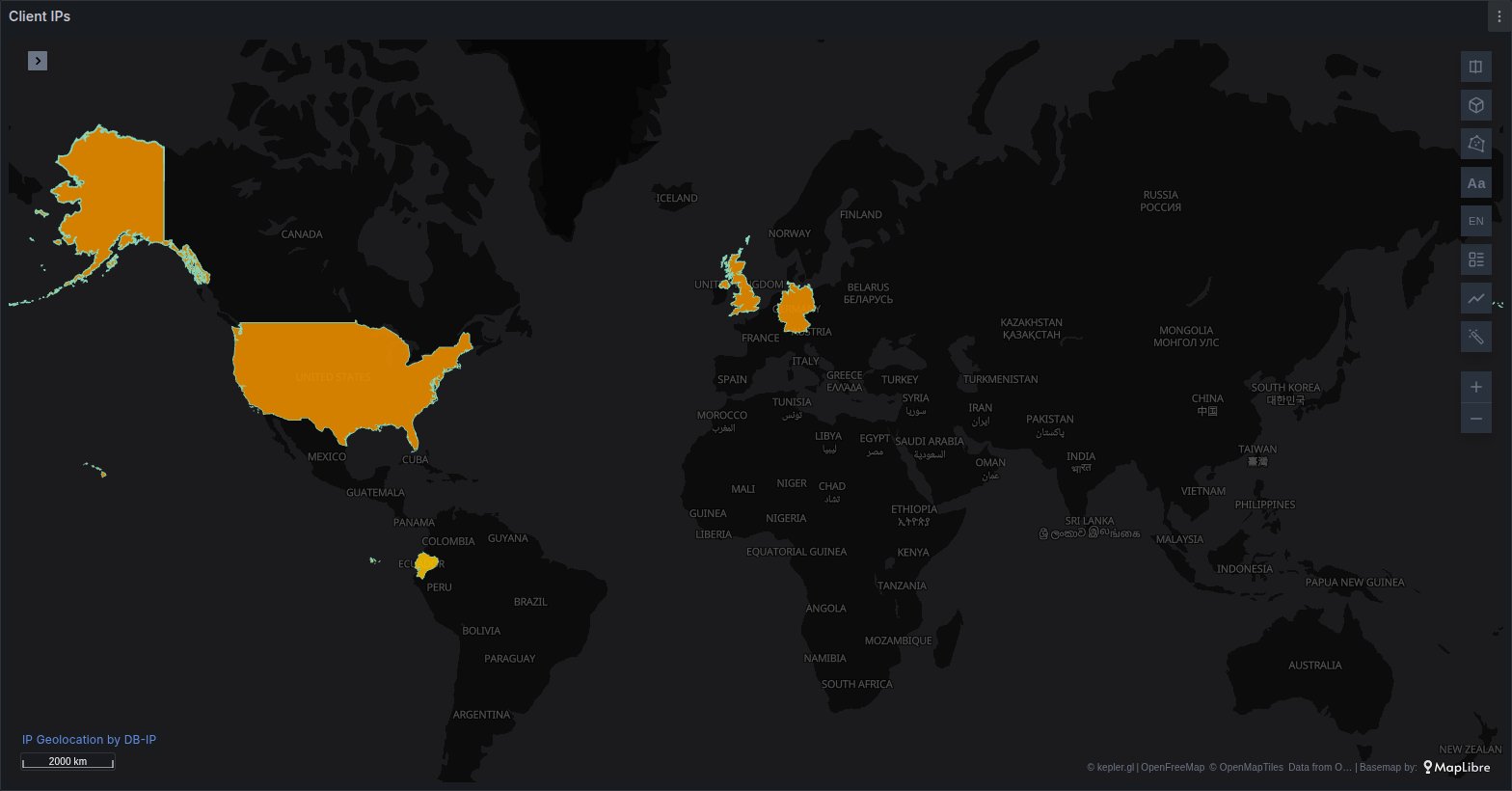
This page covers cloud regions and zones, k6 load zones, airports and CDN points of presence, geohashes, countries and IP addresses. States, provinces, counties and municipalities are placed by the same machinery but have their own page: States, provinces and municipalities.
What is recognised
| Kind | Example values | Column names that are detected | Drawn as |
|---|---|---|---|
| Cloud region / zone | us-east-1, us-east-1a, europe-west1-b, westeurope, amazon:de:frankfurt | region, cloud_region, sm_region, aws_region, location, topology_kubernetes_io_region, zone, availability_zone, topology_kubernetes_io_zone, load_zone, and each of these with a label_ prefix | points |
| Airport / POP | MIA, FRA56, IAD89-C1 | iata, airport, pop, colo, x_amz_cf_pop | points |
| Geohash | u4pruyd, 9q8y | geohash | points |
| Country | EC, PER, Colombia | country, country_code, country_iso, geo_country, geoip_country_code | choropleth, or bubbles |
| IP | 203.0.113.5, 2001:db8::1, [2001:db8::1]:443 | ip, client_ip, remote_addr, ip_address, x_forwarded_for | choropleth, or bubbles |
Column names are matched exactly, after trimming spaces, ignoring case and reading a dot as an underscore. So Region, cloud.region and label_topology_kubernetes_io_zone are all detected, while aws_region_name or client_ip_v4 are not. Any text column can still be chosen by hand in the Places options.
A pair of columns that names the two ends of something becomes a flow instead; see Flows between two places.
How a column is accepted
A name alone is not enough. Before Plus places a query, it checks the column's values:
- Only text columns are considered. A numeric column is never a place.
- Plus reads the first 50 non-empty values of the column.
- At least 80 % of them must have the form of that kind: a known region code, three letters for an airport, a valid address for an IP, and so on. Otherwise the column is not placed, and the Places options say how much of it was recognised.
That check is what keeps an unrelated column off the map, and the name is what keeps a coincidence off it. A column called status holding IN, IT, NO and ID looks like country codes, but its name is not a place name, so nothing is placed. A column called country holding n/a in most rows is not placed either.
When several columns of one query qualify, the first kind in this order wins: geohash, cloud region, airport, county or district, state or province, country, IP. A finer place therefore wins over its country.
Queries that already have a place
Plus steps aside when the free panel can already draw the query: it has coordinates, both ends of a flow, a geometry, an H3 index, imagery, or a Field mapping that gives it one of those. Such a query is drawn as it always was, even if it also has a country column. Pick a Column or a Kind in the Places options to make Plus place it anyway. See How a query becomes a map for the free panel's own detection.
Each kind
Cloud regions and zones
Region codes are matched exactly, ignoring case. A zone is reduced to its region:
| Provider | Region form | Zone forms that are accepted |
|---|---|---|
| AWS | us-east-1, us-gov-west-1 | us-east-1a, a Local Zone such as us-east-1-bos-1a, us-gov-west-1b |
| GCP | europe-west1, us-central1 | europe-west1-b |
| Azure | westeurope, eastus2 | none: Azure zones are numbers and do not name a place |
Each region is placed at the city it is named after or announced for, such as Washington, D.C. for us-east-1 or Frankfurt for europe-west3, not at a data centre. The tooltip shows the code and its name, for example eu-west-1 · Ireland. Azure's display names (West Europe) are not recognised; use the programmatic name (westeurope).
The regions that are known:
- AWS (36):
us-east-1,us-east-2,us-west-1,us-west-2,us-gov-west-1,us-gov-east-1,ca-central-1,ca-west-1,mx-central-1,sa-east-1,eu-west-1,eu-west-2,eu-west-3,eu-central-1,eu-central-2,eu-north-1,eu-south-1,eu-south-2,il-central-1,me-south-1,me-central-1,af-south-1,ap-east-1,ap-east-2,ap-south-1,ap-south-2,ap-southeast-1toap-southeast-7,ap-northeast-1,ap-northeast-2,ap-northeast-3. - GCP (42):
us-central1,us-east1,us-east4,us-east5,us-south1,us-west1tous-west4,northamerica-northeast1,northamerica-northeast2,northamerica-south1,southamerica-east1,southamerica-west1,europe-west1,europe-west2,europe-west3,europe-west4,europe-west6,europe-west8,europe-west9,europe-west10,europe-west12,europe-central2,europe-north1,europe-north2,europe-southwest1,me-west1,me-central1,me-central2,africa-south1,asia-east1,asia-east2,asia-northeast1,asia-northeast2,asia-northeast3,asia-south1,asia-south2,asia-southeast1,asia-southeast2,australia-southeast1,australia-southeast2. - Azure (59):
eastus,eastus2,centralus,northcentralus,southcentralus,westcentralus,westus,westus2,westus3,canadacentral,canadaeast,mexicocentral,brazilsouth,brazilsoutheast,chilecentral,northeurope,westeurope,uksouth,ukwest,francecentral,francesouth,germanywestcentral,germanynorth,switzerlandnorth,switzerlandwest,norwayeast,norwaywest,swedencentral,polandcentral,italynorth,spaincentral,austriaeast,belgiumcentral,denmarkeast,eastasia,southeastasia,japaneast,japanwest,koreacentral,koreasouth,centralindia,southindia,westindia,jioindiawest,jioindiacentral,australiaeast,australiasoutheast,australiacentral,australiacentral2,newzealandnorth,indonesiacentral,malaysiawest,southafricanorth,southafricawest,uaenorth,uaecentral,qatarcentral,israelcentral,taiwannorth.
A region that is not in these lists, such as one announced after this version, is not placed.
k6 load zones
k6 results carry a load_zone label, which is detected as a cloud region. The 22 load zones that are known, in any case: amazon:us:ashburn, amazon:us:columbus, amazon:us:palo alto, amazon:us:portland, amazon:ca:montreal, amazon:br:sao paulo, amazon:ie:dublin, amazon:gb:london, amazon:fr:paris, amazon:de:frankfurt, amazon:se:stockholm, amazon:it:milan, amazon:in:mumbai, amazon:sg:singapore, amazon:au:sydney, amazon:jp:tokyo, amazon:jp:osaka, amazon:kr:seoul, amazon:hk:hong kong, amazon:bh:bahrain, amazon:za:cape town, amazon:id:jakarta.
Airports and CDN points of presence
An airport is its three-letter IATA code, in any case. Many CDNs name their points of presence after the nearest airport, so a code followed by digits, and optionally by a hyphen and a suffix, is read as that airport:
| Value | Placed at |
|---|---|
MIA | Miami |
FRA56 | Frankfurt |
IAD89-C1 | Washington Dulles (the x-amz-cf-pop header) |
The values are checked by form only: any three letters pass the 80 % check, and a code that is not a real airport is left unplaced once the airport table is read. The table holds every airport in OurAirports that has an IATA code and is not closed, about 9,000 of them. Where two airports share a code, the larger one is used. The tooltip shows the code and the town, for example MIA · Miami.
Geohashes
A geohash of 1 to 12 characters from the geohash alphabet (digits and lower-case letters except a, i, l and o; upper case is accepted) is placed at the centre of its cell. The tooltip shows the geohash itself.
Only a column called exactly geohash is detected. Short country codes such as EC are valid geohashes too, which is why a column of geohashes under any other name has to be chosen by hand, with Kind set to Geohash.
kepler also builds a geohash layer of its own for a geohash column. It draws the same rows as cells, which at full precision are too small to see, so Plus switches it off. It stays in the layer list if you want it back. For a grid you aggregate yourself, H3 and S2 are drawn by the free panel.
Countries
A country can be given as:
- an ISO 3166-1 alpha-2 code (
EC), - an ISO 3166-1 alpha-3 code (
ECU), - a name as Natural Earth spells it, in its short, long, formal or English form (
Ecuador,Republic of Ecuador,United States of America), or one ofUK,U.K.,Great Britain,U.S.,U.S.A..
Case does not matter. A code always means its own country, even where it also spells a name. 237 countries and territories are known.
A country is drawn as its outline, filled by its value (a choropleth), unless Draw as is set to Bubbles. Bubbles sit at the country's label point, the spot where Natural Earth would write its name.
IP addresses
IPv4 and IPv6 addresses are accepted, including:
- an address with a port:
203.0.113.5:54321, or[2001:db8::1]:443for IPv6, - an IPv4 address written in IPv6 form:
::ffff:203.0.113.5, - an IPv6 address with a zone:
fe80::1%eth0, - an
X-Forwarded-Forlist such as203.0.113.5, 10.0.0.1, of which only the first address, the client, is read.
Each address is placed in its country, not its city: the lookup table is IP to country. Like countries, IPs are drawn as a choropleth unless Draw as is set to Bubbles.
Private and reserved addresses are left out: 10.0.0.0/8, 172.16.0.0/12, 192.168.0.0/16, loopback (127.0.0.0/8, ::1), link-local (169.254.0.0/16, fe80::/10), carrier-grade NAT (100.64.0.0/10), 0.0.0.0/8 and IPv6 unique local addresses (fc00::/7). They are counted separately in the Places options, as private, so you can tell them from addresses that were not found. An address the table has no country for is left out too.
Anycast addresses, such as public DNS resolvers and CDN edges, answer from many places at once; the table gives them one country, which need not be where the client is.
Addresses stay in Grafana
The lookup runs in the viewer's browser, against a table that ships inside the plugin and is served by your own Grafana server. No address is sent to UBICA, to DB-IP or to any other service. See Where the lookup data comes from.
Flows between two places
Two columns that name the ends of a movement become a flow, drawn by the free panel's Flow layer. The two names share a stem, which must be one of the detected column names above, with an origin prefix on one and a destination prefix on the other:
| End | Prefixes |
|---|---|
| Origin | src_, source_, from_, origin_ |
| Destination | dst_, dest_, destination_, to_, target_ |
So src_region and dst_region, from_airport and to_airport, or source_ip and dest_ip all work. Both columns have to pass the 80 % check. A row is drawn only when both of its ends are placed, so a private IP address at either end leaves the row out. States and districts are not drawn as flows.
The rows keep every column and gain origin_lat, origin_lng, dest_lat and dest_lng. Style them as in Origin–destination flows.
Columns named just source and target are something else: links between sites, drawn as a network. See Network links.
How placed rows are drawn
Points
Regions, zones, airports, POPs and geohashes become points.
- A query with a time column keeps one point per row, so kepler's time filter can play them.
- A query without a time column that names a place more than once is grouped: one point per place, with its
countof rows, or the sum or average from Colour by. - Otherwise each row stays a point of its own.
Each row gains a place column (the readable name, as in the tooltip), latitude and longitude. Plus sizes the points by the first number of the query, or by the column Colour by names.
Choropleth
Countries and IP addresses become one row per country, filled by a number: by default the count of rows in each country, or the sum or average from Colour by. Each row has country_code (ISO alpha-2), country (its name), the number, and the outline. Outlines are Natural Earth's at 1:50 million.
A country query that names each country once, with Colour by left at Count, is already one row per country. Its own columns are kept and the first number colours it: users in a query of country, users.
A choropleth has no time: rows of a query with a time column are added up over the whole time range.
Bubbles
Set Draw as to Bubbles and countries and IP addresses become points at each country instead, sized by the same number.
IP bubbles always count events: one bubble per country, with its count, sum or average. When the query has a time column, they are counted per step of time, so kepler's time filter plays them. The step is the first of 1, 5, 10 or 30 seconds, 1, 5, 10, 15 or 30 minutes, 1, 3, 6 or 12 hours, 1 day or 7 days that cuts the span of the query's times into 60 steps or fewer, and the Places options show it (per 5m). In such a query, an IP row without a time is left out.
Country bubbles follow the rules for points above.
Colour by
| Choice | Number used | Column added |
|---|---|---|
| Count | the number of rows at each place (the default) | count |
| Sum of x | the sum of the numeric column x at each place | sum_x |
| Average of x | the average of x at each place, ignoring empty cells | avg_x |
count is kept beside a sum or an average, so both can go in the tooltip. Where rows are not grouped, Sum and Average simply put x itself on each point.
Plus puts that number on the layer's colour (choropleth) or size (points) when kepler builds the layer, and keeps it there as Colour by changes. Pick another field for that channel in kepler's layer panel and the layer is yours: Plus no longer touches it. A saved map keeps the look it was saved with.
Prometheus series labelled with a place
A Prometheus query in its default Format: Time series returns one series per label set, with the place only in the labels:
promql
sum by (region) (rate(http_requests_total[5m]))The free panel reads columns, not labels, so Plus turns such a query into a table first: one row per series, each label a column, and a value column holding the series' last non-empty value. The query is then placed like any other, here as points at each region sized by value. No Format: Table and no transformation are needed.
This applies to a query when:
- every one of its series is a single number with, at most, its time, and nothing else;
- at least one series carries a label with a detected place name (
region,zone,load_zone,country,client_ip…), or an origin or destination name such assrc_region. A label named juststatedoes not count, since it is more often an alert state than a place.
A series without the label becomes a row with an empty place, which is not drawn. If you want every sample with its time, so that the time filter plays them, set Format: Table instead: the query then has a time column and keeps one point per row.
The Places options
The panel options have a Places category with one block per query, named by its refId. Every setting starts on automatic.
| Option | Choices | Shown |
|---|---|---|
| Column | Auto, or any text column of the query | always |
| Kind | Auto, Cloud region / zone, Airport / POP, Country, State / province, County / district, IP, Geohash, Off | always |
| Country, State | see States, provinces and municipalities | for states and districts |
| Draw as | Choropleth (the default), Bubbles | for countries, IPs, states and districts |
| Colour by | Count, then Sum of x and Average of x for each numeric column | when the query is placed and not a flow |
How Column and Kind combine:
| Column | Kind | What happens |
|---|---|---|
| Auto | Auto | Detection as described above. |
| Auto | a kind | The first text column with 80 % of its values of that kind, preferring one whose name matches it. This also works on a query the free panel already places. |
| chosen | Auto | That column, as the kind its name suggests, or else the first that fits in this order: cloud region, country, state, IP, airport, geohash. A county or district is never guessed. |
| chosen | a kind | That column as that kind, with no 80 % check: every value that fits is placed. |
| any | Off | The query is drawn as it came. |
The status line
Above each block, one line says what the query became, worked out the same way as on the map:
| Line | Meaning |
|---|---|
A: region → cloud region · 5/5 rows placed · points | placed |
A: client_ip → IP · 5/7 rows placed · 2 private · choropleth by count | placed; 2 rows were private addresses |
A: client_ip → IP · 6/6 rows placed · bubbles by count per 5m | IP bubbles counted per 5 minutes |
A: src_region → dst_region → cloud region · 3/3 rows placed · flows | a flow |
A: country: 40% recognised, not placed | the column failed the 80 % check |
A: not placed (no place column) | nothing in the query was taken for a place |
A: already placed (coordinates, geometry, H3, imagery or Field mapping) | the free panel draws it; Plus steps aside |
A: not placed (the query already has a "place" column) | Plus would add a column the query already has |
A: client_ip → IP · IP table unavailable, not placed | the lookup data could not be loaded |
A: off | Kind is Off |
While a data file is still loading, the line shows the share of values recognised instead of the row counts.
When a value does not land
Work through these in order:
- Read the status line in the Places options. It tells you whether the query was placed at all, which column and kind were used, and how many rows were placed.
not placed (no place column): the column name is not one of the detected names, or the column is not text. Choose it under Column, or rename it in the query (AS region). A numeric column has to be cast to text.… recognised, not placed: fewer than 80 % of the first 50 values fit. Check them against the formats on this page; a column that is mostlyunknown,-or a provider's display name will fail. Set Kind as well as Column to place the values that do fit anyway.already placed (…): the query has coordinates, a geometry, H3 or a Field mapping, and the free panel draws it. Choose a Column or a Kind to place it by name instead.n/m rows placedwith n smaller than m: the other rows are empty, private addresses, or values that are not in the tables, such as a region announced after this version, a three-letter code that is not an airport, or an address with no country. Those rows are left off the map; nothing is drawn at a guessed position. The Places options count them but do not list them: look at the query's values in Grafana's table view or the query inspector, and compare them with the formats above.… unavailable, not placed, also shown in the map's corner: the airport table, the IP table or the country outlines could not be downloaded from your Grafana server within 15 seconds. Reload the page; a failure is remembered until then.the query already has a "place" column(ororigin_latand the other flow columns): rename that column in the query.
Where the lookup data comes from
Everything Plus needs to place a value ships with the plugin. Cloud regions, k6 load zones and country names and codes are part of the panel's code. Three larger files are downloaded only when a query needs them, once per page, and are served by your Grafana server from the plugin's own files, like the panel itself:
| File | Needed for | Download size | Source and licence |
|---|---|---|---|
| IP table | IP addresses | about 720 KB | DB-IP IP to Country Lite, September 2026 edition, CC BY 4.0 |
| Airport table | airports and POPs | about 150 KB | OurAirports, public domain |
| Country shapes | choropleths of countries and IPs | about 430 KB | Natural Earth Admin 0 countries at 1:50 million, public domain |
Country names, codes and label points also come from Natural Earth, and region and load zone positions from Natural Earth's populated places. No request goes to DB-IP, OurAirports, Natural Earth or any other third party, so places work on a Grafana server with no internet access. The tables are as current as the plugin version you have installed.
Whenever IP addresses are drawn, the map shows the credit DB-IP's licence asks for in its lower-left corner: